

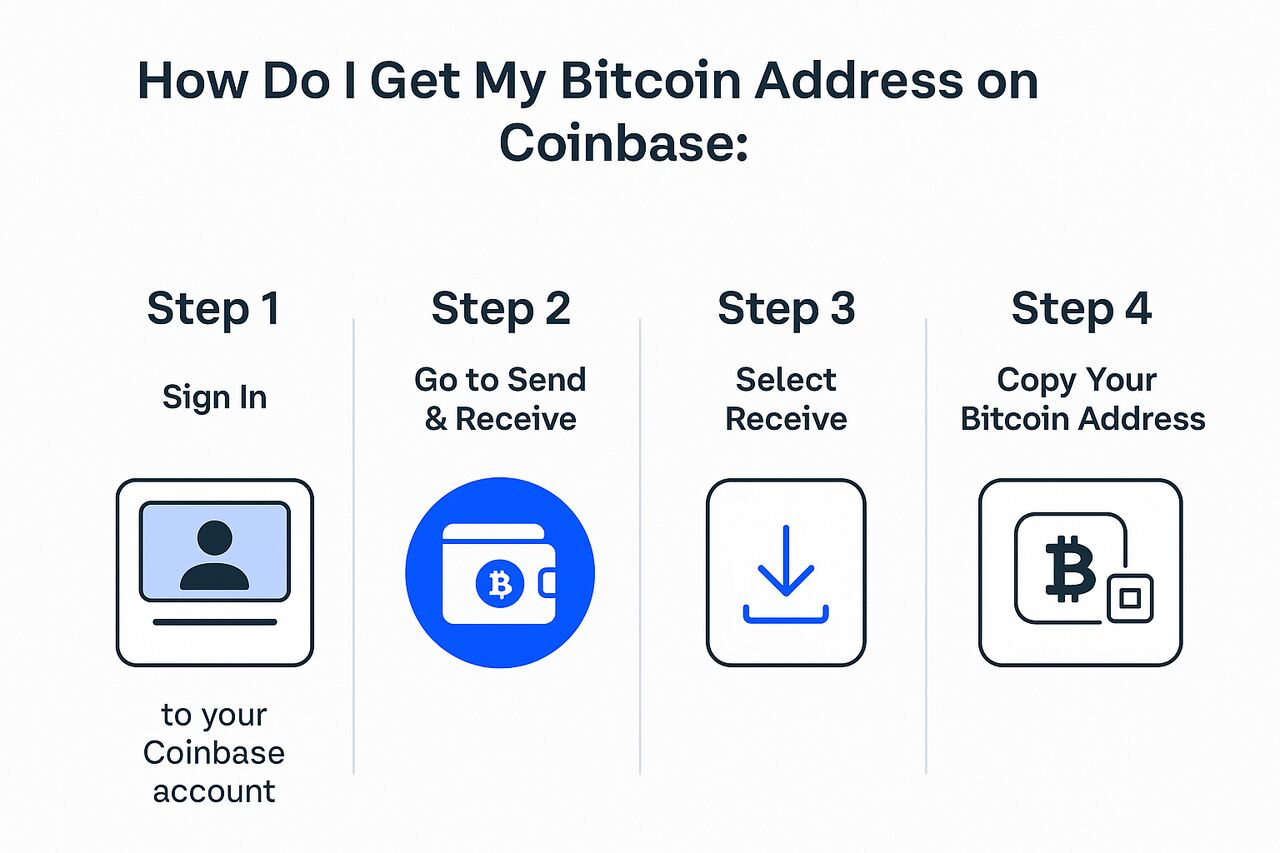
Retrieving your Bitcoin (BTC) address on Coinbase is essential for receiving crypto safely and correctly into your account. Your BTC address acts as the public identifier that other senders use when transferring Bitcoin to you. This guide explains every step you must follow on both desktop and mobile, covers custodial vs self-custody address differences, and resolves common problems such as missing addresses or address rotation. With clear instructions, actionable steps, security tips, and entity-based context, this article ensures you always use the correct Bitcoin address on Coinbase.
Gather the Correct Bitcoin Asset Before Retrieving Your Address
You must begin by selecting Bitcoin (BTC) specifically, because Coinbase organizes wallet addresses by individual asset. Users often choose the wrong asset—such as Bitcoin Cash (BCH) or Wrapped Bitcoin (WBTC)—and expect the BTC address to appear, but each network uses different address formats and incompatible chains. Selecting the correct asset ensures Coinbase displays the correct public address and QR code for receiving Bitcoin deposits.
The Bitcoin asset page on Coinbase contains several elements that control how your address is generated: asset type (BTC), chain designation (Bitcoin Network), deposit method (Receive / Wallet Address), and address metadata (SegWit, native SegWit, Taproot). Although Coinbase usually chooses the preferred address type automatically, knowing the underlying components helps prevent transfer mistakes and network confusion.
Bitcoin’s network is independent from EVM chains, TRON, Solana, or layer-2 solutions, so retrieving a Bitcoin address requires confirming that the deposit route uses the Bitcoin blockchain. Coinbase’s interface makes this clear by labeling BTC addresses under the native “Bitcoin” network. Using the matching chain maintains transaction validity and ensures the deposit is credited correctly to your account.
Access Your Bitcoin Address Using the Coinbase Web Interface
Finding your BTC address on the Coinbase website is the fastest method for desktop users. The process begins by logging in to your Coinbase account, navigating to the “Assets” or “Portfolio” page, and selecting Bitcoin (BTC). Once the Bitcoin asset page opens, the deposit functions will appear, usually under the Receive, Deposit, or Crypto addresses button depending on the user interface version. Selecting “Receive” immediately displays your Bitcoin public address and a scannable QR code.
The Bitcoin address on web includes several helpful components: a long alphanumeric string representing your public key, a QR code for faster wallet scanning, a copy icon for error-free copying, and network labels that confirm you are viewing a Bitcoin-network (BTC) address. Coinbase may also show multiple historical deposit addresses in the “Crypto addresses” section, which are grouped under the Bitcoin asset. These allow you to review or reuse older BTC addresses.
Contextually, Coinbase continuously updates its interface, so names such as “Receive,” “Wallet address,” or “Crypto addresses” may change, but the underlying process remains the same: open the BTC asset page → choose “Receive” → copy or scan your address. Whether you are transferring from another exchange, a hardware wallet, or an external wallet app, the address displayed under Bitcoin will always be your correct Coinbase deposit address.
Copy and Share Your Bitcoin Address After Retrieval
After retrieving your Bitcoin address, the next step is copying and sharing it correctly. On the Coinbase web platform, you can use the built-in copy button next to the address string. This eliminates manual selection errors and ensures the address pasted into another platform matches exactly. Sharing the QR code is another convenient option when transferring BTC from a mobile wallet, as it prevents typos entirely.
The Coinbase address panel contains attributes that support safe sharing: full public address string, QR code encoding, standardized address format (starting with “3,” “bc1,” or “1” depending on type), and share icons for messaging apps or email. These tools maintain accuracy while preventing human error, especially since Bitcoin transactions are irreversible. Use the “Copy Address” icon whenever possible rather than manually highlighting the text.
In broader usage, your public Bitcoin address is safe to share because it contains no private or sensitive data. Bitcoin addresses function like bank account numbers—publicly shareable but permanent in transaction history. Coinbase never reveals your private keys for your custodial BTC wallet, so sharing your address does not grant access to your account. Still, always verify that the address belongs to the correct Coinbase asset before sending large transactions.
Retrieve Your Bitcoin Address Through the Coinbase Mobile App
Mobile users can get their Bitcoin address through the Coinbase app by tapping Transfer, Receive, or Add crypto—depending on the current interface—then selecting Bitcoin (BTC). Once you choose Bitcoin, Coinbase immediately displays your BTC address and QR code. Mobile retrieval is especially convenient when receiving BTC from a hardware wallet or another phone-based application.
Inside the mobile Bitcoin receive menu, you’ll find metadata such as network type (Bitcoin), appropriate address format (usually bc1 for native SegWit), and copy/share icons. Some versions of the app also ask you to confirm the network before showing the final address. This prevents confusion between Bitcoin and wrapped versions like WBTC on Ethereum.
Using the mobile app offers additional context-driven advantages: faster QR scanning, easier sharing through mobile messaging apps, and improved accessibility during in-person transfers. If you manage multiple Coinbase accounts or assets, the mobile app also makes switching between wallets quick and intuitive.
Identify the Correct Address When Coinbase Provides Multiple BTC Addresses
Coinbase may display multiple historical Bitcoin addresses under your profile’s “Crypto addresses” section. This occurs because Coinbase uses address rotation, a standard blockchain privacy practice. New addresses generate automatically each time you click “Receive,” but older addresses remain fully valid for future deposits.
Multiple address entries include attributes such as creation date, address type (SegWit, Taproot, legacy), and deposit status (active or unused). This system protects user privacy by reducing transaction traceability on the public blockchain, even though all addresses route to the same Coinbase-held BTC balance internally.
Understanding address rotation ensures you choose the correct address confidently. Any BTC address that Coinbase previously assigned to your account will still credit your balance. You can safely reuse an old address or generate a new one depending on your preference for privacy or record-keeping.
Compare Coinbase Exchange Addresses vs. Coinbase Wallet Addresses
Coinbase offers two separate products: the Coinbase exchange account (custodial) and Coinbase Wallet (self-custodial). These platforms supply different types of Bitcoin addresses, and users often confuse them. A custodial Coinbase address stores your Bitcoin within Coinbase’s managed infrastructure, whereas a Coinbase Wallet address stores funds in a self-custody environment where you hold your own private keys.
Custodial exchange addresses have attributes such as managed private keys, shared liquidity infrastructure, and direct integration with Coinbase’s trading platform. In contrast, Coinbase Wallet addresses include cryptographic private key storage, seed phrase backup, and direct control of all outgoing transactions. Because these tools serve two different user groups, each platform generates its own separate BTC address.
While both addresses support Bitcoin deposits, you must choose the one that matches your intended purpose. If you want your BTC stored in your Coinbase trading account, use the exchange-generated address. If you want full control over your Bitcoin, independent of Coinbase’s custody, use the Coinbase Wallet address. Mixing them up may lead to confusion or accessibility issues.
Confirm Asset and Network Details Before Using or Sharing Your BTC Address
Before sharing your Bitcoin address, confirm that the asset selected is Bitcoin (BTC) and not another cryptocurrency such as BCH, WBTC, or Bitcoin on a layer-2 network. Using the wrong network for BTC transfers can result in permanent loss of funds. Coinbase labels each asset clearly, and your Bitcoin address will always be tied to the native Bitcoin blockchain.
Security attributes to verify include address format (bc1 is most common), matching chain type (Bitcoin), and correct asset name (BTC). These confirmations prevent accidental deposits to incompatible networks. Use only the copy button or QR code scan to minimize typing mistakes.
In broader context, verifying network details is a universal crypto best practice. Blockchain transactions cannot be reversed, so performing a small confirmation transaction before transferring large BTC amounts ensures you are using the correct address and prevents irreversible loss.
Troubleshoot Missing or Hidden Bitcoin Addresses in Coinbase
If you cannot find your BTC address, the first step is confirming you selected Bitcoin (BTC) rather than another asset. Many users mistakenly view the wrong token’s page and expect a Bitcoin address to appear. Next, confirm that you are using the correct Coinbase platform: Coinbase Exchange, Coinbase App, or Coinbase Wallet. Each platform organizes assets differently, and address menus may appear under “Receive,” “Assets,” or “Crypto addresses.”
Troubleshooting tools include switching to the web interface, logging out and in again, refreshing the app, and checking the “Crypto addresses” section where historical addresses may be stored. If you use both Coinbase App and Coinbase Wallet, verify that you are not mixing the two systems; wallet addresses do not appear in the exchange interface.
If none of these steps resolve the issue, contacting Coinbase Support is the safest method. Coinbase can confirm your account’s deposit settings, check for restrictions, and help regenerate a valid BTC address. This step ensures your deposits remain secure and correctly routed.
Coinbase Exchange Address vs. Coinbase Wallet Address
| Attribute | Coinbase Exchange (Custodial) | Coinbase Wallet (Self-Custody) |
|---|---|---|
| Private Key Control | Held by Coinbase | Held by user |
| Typical Use | Trading, liquidity, quick transfers | Long-term holding, dApps, self-custody |
| Address Type | Exchange-managed BTC address | User-generated BTC address |
| Recoverability | Account recovery via Coinbase | Seed-phrase recovery only |
| Best For | Beginners, traders | Advanced users wanting full control |
Common Reasons Users Can’t Find Their BTC Address
| Issue | Explanation | Fix |
|---|---|---|
| Wrong asset selected | User clicked BCH, WBTC, or another coin | Select Bitcoin (BTC) under Assets |
| Using Coinbase Wallet by mistake | Wallet shows self-custody address, not exchange | Open Coinbase Exchange app |
| UI change / missing “Receive” button | Interface version differs | Look for “Deposit” or “Crypto addresses” |
| Network mismatch | User expects BTC address under another chain | Select Bitcoin network |
| Account restriction | Deposits temporarily disabled | Contact Coinbase Support |
Conclusion
Retrieving your Bitcoin address on Coinbase is straightforward when you understand which asset, network, and platform you are using. Whether you access it through the Coinbase web interface or the mobile app, the key steps remain consistent: select Bitcoin (BTC), open the Receive menu, and copy or scan the provided address. With address rotation, custodial vs. self-custody differences, and security precautions understood, you can confidently share or use your BTC address for deposits. Following the guidance in this article ensures safe, accurate, and efficient Bitcoin transfers every time.
FAQs
1. Can I reuse the same Bitcoin address from Coinbase?
Yes. All previously generated Coinbase Bitcoin addresses remain valid, even if new ones are issued for privacy.
2. Why does Coinbase generate new deposit addresses?
For enhanced privacy and reduced transaction traceability. This practice is standard in major exchanges.
3. Is a Coinbase Wallet address the same as a Coinbase exchange address?
No. Coinbase Wallet is a self-custody product, while Coinbase exchange addresses are custodial.
4. What if I don’t see a Bitcoin “Receive” button on Coinbase?
You may be viewing the wrong asset or the wrong version of Coinbase. Select BTC under Assets.
5. Can I safely share my Bitcoin address publicly?
Yes—public BTC addresses are safe to share. Never share private keys or seed phrases.
6. Are BTC transactions reversible if I send to the wrong address?
No. Bitcoin transfers are irreversible. Always verify the address before sending.
