

Introduction
Coinbase Advanced—also known as Advanced Trade—is the professional-grade interface offered by Coinbase Global, Inc. Designed for experienced crypto traders, it provides deeper charting tools, real-time order-book visibility, expanded order types, lower maker/taker fees, and integrated USDC-settled markets. Understanding how this interface works is essential if you frequently execute trades, analyze technical indicators, or need greater control than the standard Coinbase mode provides. This comprehensive guide explains every part of the platform, how to access it, how the fee model works, the role of USDC, and whether it is the right environment for your trading strategies.
What is Coinbase Advanced and how does it differ from standard Coinbase?
Coinbase Advanced is the high-control trading interface within Coinbase that replaces the legacy Coinbase Pro platform. It answers the need for a dedicated place where advanced traders can execute orders with more precision, lower fees, deeper analytics, and real-time market data. The basic Coinbase interface focuses on simplicity, but Coinbase Advanced focuses on speed, data density, and professional-level execution tools essential for high-volume and technically oriented traders.
The platform differs from standard mode through its robust feature set: order-book depth charts, multi-interval candlestick charts, limit, stop-limit, and bracket orders, and volume-based fee tiers. Coinbase Advanced includes USDC-settled trading pairs, an expanded portfolio panel, as well as keyboard shortcuts and tighter spreads across liquid markets. These characteristics make the platform significantly more aligned with trader needs compared to the beginner interface.
This separation between entry-level and professional features reflects Coinbase’s shift from the older Coinbase Pro model to a unified but segmented trading environment. It allows active users to enjoy a low-latency interface while still benefiting from the custody, regulation, and security standards associated with Coinbase Global, Inc.
What features set Coinbase Advanced apart from the basic trading interface?
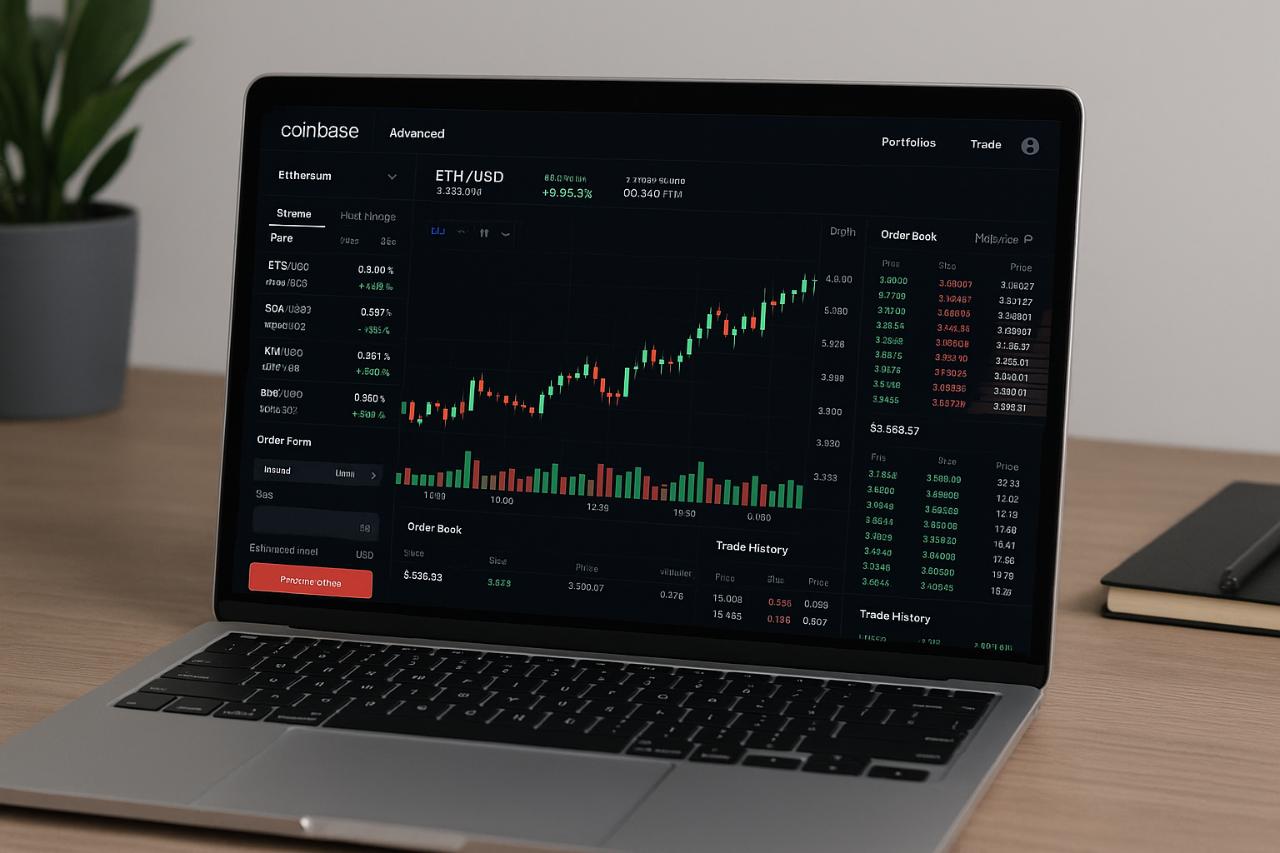
The primary feature is the advanced charting engine, built for granular technical analysis. It introduces time-frame switching, multiple overlays, and precise zoom controls. The order-book panel displays bid/ask depth in real time, enabling traders to anticipate liquidity shifts. The trade execution box supports multiple order types and displays estimated fees, slippage, and post-trade balances.
Beyond technical tools, Coinbase Advanced offers lower maker fees, USDC rewards, and improved visibility on trading pairs. The platform is optimized for active order placement with minimal UI friction, where traders can enter, edit, or cancel orders quickly under fast-moving conditions.
Who is the target user for Coinbase Advanced?
Coinbase Advanced is designed for high-volume traders, technical analysts, and frequent order-book users who require professional functionality. The interface benefits traders who view crypto markets like traditional FX or equities, with tight execution control. It also serves active participants in USDC-settled markets, international spot traders, and those seeking fee optimization through volume tiers.
How do I access and start using Coinbase Advanced?
Accessing Coinbase Advanced is straightforward because it is integrated directly into the main Coinbase platform. Users can toggle between “Simple” and “Advanced” views, allowing seamless switching depending on their trading task. This eliminates old concerns about transferring balances between Coinbase and Coinbase Pro, as both now share a unified wallet system.
To get started, log into your Coinbase account and navigate to the Advanced Trade section. The system automatically checks your region, identity verification level, and available trading pairs, then loads the professional interface. On mobile, accessing Advanced simply requires selecting the Advanced mode from the trading tab.
Eligibility depends on regional availability, regulatory permissions, and account verification. For example, some countries may support view-only market data but not execution for certain assets. Verifying your identity and completing KYC steps ensures access to all available tools and USDC rewards.
How do you switch to Advanced Trade on desktop and mobile?
On desktop, click “Trade” → choose “Advanced” → select a trading pair. The platform opens with charts, order books, and the trading panel.
On mobile, open the Coinbase app → tap “Trade” → select “Advanced Trade.” Once inside, pair selection and order placement follow the same workflow as desktop but optimized for mobile ergonomics.
Eligibility requirements (region, verification, rules)
To use Coinbase Advanced, you must:
✔ Have a verified Coinbase account
✔ Maintain region eligibility based on local regulations
✔ Agree to trading-specific terms related to risk and order types
✔ Use supported currencies (USD, USDC, or local equivalents depending on region)
Certain regions—including some in Asia, Latin America, and Africa—may have restricted availability for specific assets or USDC settlement pairs. For example, availability for users in Pakistan can depend on ongoing local regulatory assessments.
What trading tools and order types does Coinbase Advanced support?
Coinbase Advanced supplies a full spectrum of trading tools found in professional markets. It integrates multi-layer charts, depth indicators, and the real-time order book into a single interface. The platform’s technical engine supports quick order placement and provides immediate feedback on potential slippage or fee impacts.
The available order types include market, limit, stop-limit, and bracket orders, each allowing increased precision for entry and exit strategies. Traders can navigate through overlays, chart intervals, and liquidity metrics to determine the best approach for their system.
The advanced chart block includes candlestick charts, volume data, moving averages, and other technical indicators. The order book displays bids, asks, and aggregate liquidity levels. These tools help traders understand momentum, supply/demand imbalances, and short-term volatility.
How limit, market, stop-limit, and bracket orders work
- Market Orders: Instantly execute at the best available price. Useful for fast entry/exit but may incur slippage.
- Limit Orders: Set a specific price for execution. Ideal for precision control or capturing optimal entry points.
- Stop-Limit Orders: Combine trigger and limit price to create conditional entries/exits. Essential for risk management.
- Bracket Orders: Create a parent order with predefined take-profit and stop-loss levels. This mirrors traditional trading features in equities and futures platforms.
How to read advanced charts and order books
The candlestick chart displays open, high, low, and close (OHLC) values for each interval, helping traders identify patterns like breakouts, reversals, or consolidation zones. The order book lays out current bids on one side and asks on the other, with color coding for depth. This visual depth helps traders gauge market sentiment, liquidity walls, and short-term volatility pockets.
What are the fee structures and rewards on Coinbase Advanced?
Coinbase Advanced uses a maker/taker fee model based on your 30-day trading volume tier. Maker fees reward liquidity provision, while taker fees apply when removing liquidity. Higher trading volume unlocks lower fees across both categories, offering cost advantages for active traders executing frequent orders.
USDC holdings within the platform may earn USDC rewards at rates announced by Coinbase (e.g., ~4% APY for eligible regions). Rewards are distributed automatically, and traders can deploy USDC into trading pairs without sacrificing earning potential.
Below is a simplified fee comparison point:
| Tier | 30-Day Volume | Maker Fee | Taker Fee |
| Tier 1 | $0–$10K | Higher | Higher |
| Tier 3 | $50K–$100K | Moderate | Lower |
| Tier 5 | $500K+ | Low | Lowest |
How fee tiers work and how to reduce fees
Fee tiers depend on your cumulative 30-day volume across all spot markets. By increasing volume—especially with maker orders—you progressively reduce trading costs. For example, using limit orders to add liquidity can push you toward lower maker fees while still achieving desired price execution.
USDC reward programs
Coinbase Advanced supports USDC rewards by paying returns on your USDC balance, regardless of whether it is actively being traded. This incentivizes traders to use USDC-settled markets, which can offer higher liquidity and lower slippage on major assets like BTC and ETH.
Is Coinbase Advanced right for me?
Coinbase Advanced is well-suited if you prioritize precision, speed, charting depth, and cost efficiency. It offers a structured environment similar to legacy Coinbase Pro, with added convenience from unified balances. The platform excels in price control, order management, and data visibility.
However, if you prefer simple buy/sell transactions or avoid advanced order types, the standard Coinbase interface may be more appropriate. New traders often find the Professional UX overwhelming, whereas advanced traders find it essential for strategic execution.
Pros and cons of using Coinbase Advanced
Pros
- Lower fees and volume-based discounts
- Real-time order book and detailed charts
- USDC trading benefits and reward potential
- Quick order editing/cancelling with keyboard shortcuts
- Unified balances across Coinbase ecosystem
Cons
- No margin or leverage in most regions
- Complexity may deter beginners
- Regional restrictions can limit asset access
- Requires understanding of order-book mechanics
Comparison with alternatives
Compared to other exchanges like Binance, Kraken, or Bybit, Coinbase Advanced emphasizes regulated operations, custody protections, and user safety, while maintaining professional-grade tools. Traders seeking futures or high-leverage trading may need to supplement Coinbase Advanced with other platforms, depending on region.
Risks advanced traders should be aware of
Crypto markets are volatile and can exhibit rapid liquidity changes. Advanced users must understand order execution risk, slippage, stop-limit failures, exchange outages, and regulatory shifts. Bracket orders reduce risk but cannot eliminate it entirely.
What are future developments and upgrades for Coinbase Advanced?
Coinbase has announced ongoing improvements to the Advanced interface, particularly around USDC-settled markets, international expansion, and charting upgrades. Enhancements include UI improvements, more analytic tools, and broader global support.
Future trends may include global USDC adoption, institutional-grade features, and better integration with Coinbase One or subscription-based benefits. As crypto trading evolves, Coinbase may expand Advanced Trade globally to mirror institutional FX-style environments.
Recent enhancements
Coinbase highlighted a UX redesign and performance improvements in mid-2023, focused on faster charts and streamlined pair navigation.
Upcoming features likely in the crypto-trading environment
The next wave may include cross-platform watchlists, more settlement currencies, expanded API endpoints, and deeper reporting tools for professional traders.
How do I get started with a step-by-step setup and best practices?
Getting started involves enabling Advanced mode, funding your account, selecting your trading pair, and placing your first order. The interface guides you through each part, but understanding the workflow ensures better control and reduced mistakes.
To begin, toggle into Advanced Mode, deposit or transfer funds, select your market (e.g., BTC-USDC), choose your order type, and confirm execution. Once set up, you can manage open orders, edit your positions, and view trading history from the dashboard.
Step-by-step: enabling Advanced and placing a trade
- Log into Coinbase
- Navigate to Trade → Advanced
- Select a trading pair (e.g., ETH-USDC)
- Open chart, examine order book, plan entry
- Choose order type (market, limit, stop-limit, bracket)
- Enter amount
- Review maker/taker fee estimate
- Execute the trade
- Monitor open positions
Best practices for managing risk
- Use bracket orders to automate exits
- Stick to a predefined volume tier strategy
- Avoid market orders during high volatility
- Monitor liquidity depth before placing large trades
- Keep reserves in USDC to reduce transfer delays
- Track fee impacts on high-frequency strategies
Conclusion
Coinbase Advanced offers a powerful, professional-grade environment for active crypto traders who need precise order execution, deep charting, and competitive fees. As the successor to Coinbase Pro, it combines the regulated security of Coinbase with modern tools that support technical analysis and advanced order strategies. Whether you prioritize lower fees, USDC rewards, or fast execution, Coinbase Advanced can significantly enhance your trading performance when used with proper risk management and a structured workflow.
Explore more insightful and valuable content on our blog smallfinance.us! Stay updated with helpful tips, expert advice, and in-depth articles that enhance your knowledge.
FAQ
What does “Advanced Trade” mean on Coinbase?
It is Coinbase’s professional trading interface featuring advanced tools, order types, deeper charts, and lower fees compared to the simple buy/sell interface.
Is Coinbase Advanced available in Pakistan?
Availability depends on regional regulations. Some countries have restricted access to certain assets or trading features; users in Pakistan should check eligibility inside the app.
Does Coinbase Advanced cost more or less than standard mode?
It generally costs less for high-volume traders because its maker/taker fees decrease with higher 30-day volume.
Do I get USDC rewards in Coinbase Advanced?
Yes, eligible regions can receive USDC rewards—often around ~4% APY—on their USDC balance within the Advanced environment.
Can I use simple market orders in Advanced Trade?
Yes. The platform supports market, limit, stop-limit, and bracket orders.
Does Coinbase Advanced include margin or futures trading?
Advanced focuses on spot and USDC-settled markets. Futures or derivatives may be available under separate regulated products depending on region.
What volume is needed for the lowest fees?
Lower fees unlock at high 30-day trading volumes, with significant reductions at levels such as $500,000+ per month.
